How Much Data Do I Need for My Trip? A Traveler’s Guide
Share:
Figuring out how much data you’ll need for a trip can feel like a shot in the dark, but it really doesn’t have to be. For a standard week-long holiday, a 5GB to 10GB plan is a safe bet for most travelers. That should comfortably cover moderate use for things like maps, social media, and a bit of browsing.
Of course, if you’re a heavy user—maybe you stream videos to unwind or need to work remotely—you’ll want to aim higher. In that case, think about 20GB or more to avoid any stressful mid-trip top-ups.
Quickly Estimating Your Travel Data Needs
The best way to gauge your data needs is to think about your travel style. Let’s be honest, not everyone uses their phone the same way abroad. A one-size-fits-all plan rarely works. Are you the type to just pull up a map and check a few emails, or are you uploading high-resolution videos to your Instagram story all day long?
Your daily habits are what really drive your data consumption. For instance, a casual sightseer might only burn through a couple of gigabytes in a week. On the other hand, a digital nomad hopping between cafés in Europe will need a much larger data allowance to stay productive. Pinpointing your profile is the first and most important step.
Common Traveler Profiles and Data Needs
To make this super simple, we’ve sketched out three common traveler types. See which one sounds most like you, and you’ll get a practical data recommendation for a one-week trip right off the bat.
Quick Data Recommendations for a One-Week Trip
Find your traveler profile to see our suggested starting data allowance.
Traveler Profile
Typical Activities
Suggested Weekly Data
The Casual Tourist
Using maps for navigation, light browsing for recommendations, and occasional messaging.
3GB – 5GB
The Social Sharer
Regularly uploading photos and short videos to social media, messaging, and streaming music.
5GB – 15GB
The Digital Nomad
Working online, taking video calls, heavy map use, and streaming media for entertainment.
20GB+
Think of these numbers as a solid baseline. If your trip is longer than a week, you can just scale them up. A Social Sharer on a two-week tour of Asia, for example, should probably look for a plan with at least 10GB to 20GB.
Key Takeaway: Start by figuring out which traveler type you are. This simple step gives you a clear starting point and helps you avoid either paying for data you’ll never use or running out right when you need it most.
It also helps to have a gut feeling for how far certain amounts of data go. To get a better sense of that, check out our deep dive into what you can do with a 3GB plan. And for anyone curious about building their own estimation tools, learning how to create a calculator is a great place to start. A good initial estimate lets you travel with confidence, knowing your connection is sorted.
What Actually Burns Through Your Mobile Data?
Ever been halfway through a trip, gone to look something up, and been hit with that dreaded “no data remaining” notification? It’s a frustratingly common travel experience.
Think of your travel eSIM data plan like a budget for your trip. Some things, like sending a quick WhatsApp message, are like buying a coffee – they barely make a dent. But other activities, like streaming a movie in your hotel room, are like booking a fancy dinner – they can wipe out a big chunk of your budget in one go. To pick the right data plan, you first need to know which of your phone habits are the most expensive.
The Four Main Data Hogs
While almost everything your phone does online uses some data, a few activities are responsible for the lion’s share of consumption. When you’re traveling and away from your home Wi-Fi, you’ll probably find yourself relying on these more than usual.
Video Streaming: This is, without a doubt, the number one data guzzler. Watching Netflix, catching up on YouTube, or even just scrolling through endless high-quality TikToks and Instagram Reels will chew through your gigabytes faster than anything else. An hour of streaming in High Definition (HD) can easily use over 1GB of data.
High-Resolution Social Media: It’s not just the videos. Constantly uploading all your high-resolution holiday photos and scrolling through image-heavy feeds on apps like Instagram and Facebook also adds up surprisingly quickly. Every photo you post and every Story you view chips away at your allowance.
Live Map Navigation: Using maps for real-time, turn-by-turn directions is a travel lifeline, but it needs a constant connection to update your position and load the map around you. While it’s not as heavy as streaming video, an hour of active navigation can still use a noticeable chunk of data. We’ve actually dived deep into this topic in our guide on how much data Google Maps uses.
Music and Podcast Streaming: Kicking back on a long train journey with a Spotify playlist or your favorite podcast is a great way to pass the time. Just be aware that streaming at high quality can consume over 100MB per hour. Over a few weeks of travel, that really starts to accumulate.
Once you get a feel for these main culprits, you can start to predict your own usage. A long travel day with hours of Google Maps running, followed by a quiet evening streaming a film, will be far more data-intensive than a day spent wandering a city and only checking your messages from time to time.
Why We’re All Using So Much More Data
It’s not just you – mobile data usage is going through the roof, and it’s almost entirely down to our ever-growing appetite for video.
Take the UK, for instance. People are using more mobile data than ever. Projections show the average monthly data usage per SIM is set to hit an incredible 98.34 GB by 2025. That’s a mind-boggling jump from just 1.26 GB back in 2016, and video streaming is the clear driver behind it.
This explosive growth tells a clear story about how our digital habits have transformed. A data plan that seemed generous just a couple of years ago might barely cover a casual user’s needs today, especially when they’re traveling without easy access to Wi-Fi.
This is a critical point for any traveler to grasp. The data you needed for your trip two years ago is probably not a reliable guide for what you’ll need now. With 4K streaming now common on phones and social media platforms pushing more video than ever, the right answer to “how much data do I need?” is always changing.
This is why a flexible travel eSIM is such a game-changer. It lets you adapt to your real-world needs on the go, ensuring you’re not stuck with a plan that’s too small for your modern travel style.
How to Work Out Your Own Data Needs for Any Trip
Forget generic advice for a moment. The best way to figure out how much data you’ll need on your travels is to look at what you’re already using. Your current phone habits are the single best predictor of what you’ll need abroad, even with a change of scenery.
It’s not as complicated as it sounds. Your smartphone is already keeping tabs on every megabyte you use. A quick look at its settings will give you a real, evidence-based starting point, taking all the guesswork out of the equation.
Check Your Current Data Usage
Finding your data usage stats is simple on any modern phone. It takes less than a minute and gives you a clear picture of your digital footprint over the last month.
For iPhone Users:
Open the Settings app.
Tap on Mobile Data.
Scroll down to the Current Period section to see your total data usage since you last reset the counter.
For Android Users:
Open the Settings app.
Go to Network & internet and then tap SIMs.
Select App data usage. This will show your total data for a specific billing cycle.
Once you have that number, you’ve got your personal baseline. For example, if you used 15GB last month, that’s your starting point. For a one-week trip, you can just divide that by four, which gives you a rough baseline of 3.75GB.
Tweaking Your Baseline for Travel
Now for the important part: adjusting that baseline. Let’s be honest, we use our phones differently on holiday. We tend to lean on them more for navigation and can’t always count on finding a reliable Wi-Fi network like we have at home or in the office.
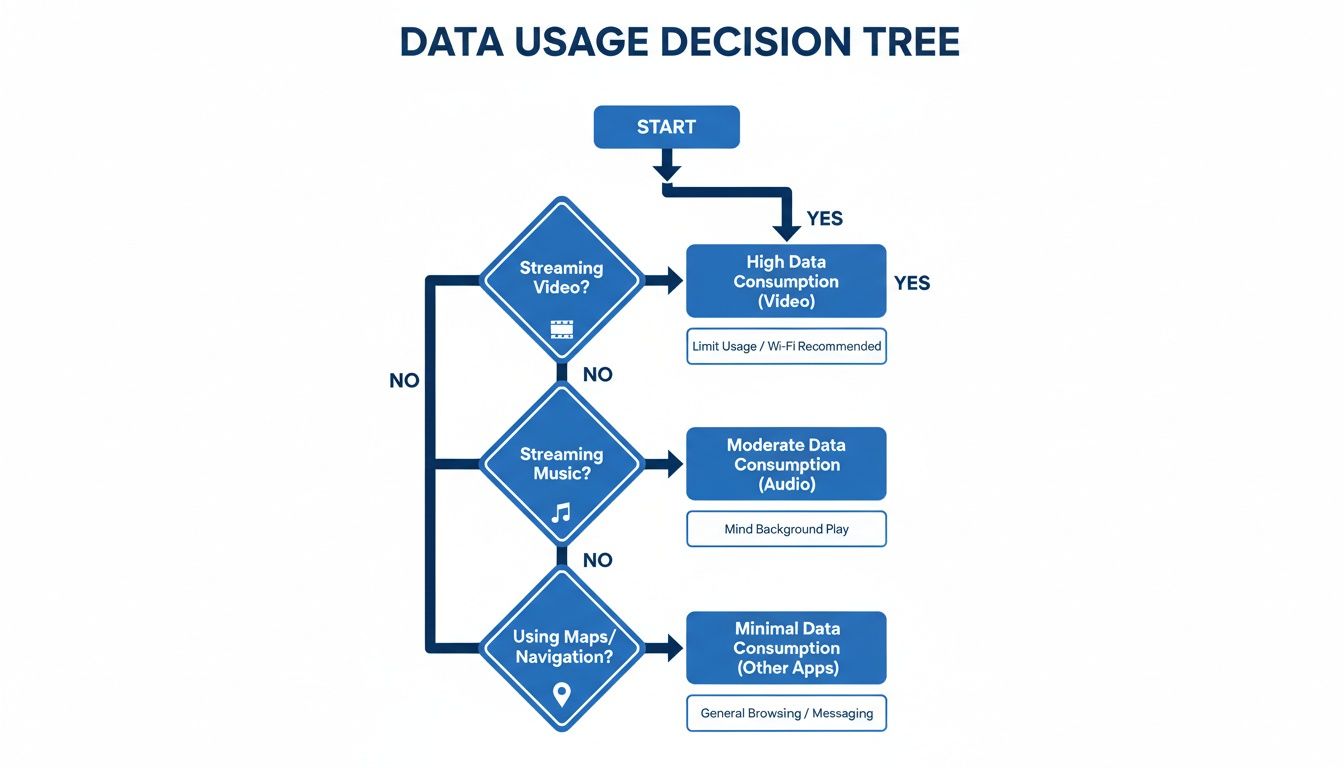
This visual guide gives you a quick idea of how different activities stack up.
As you can see, video is the biggest data-eater by a long shot, with constant map use coming in second. These are the two key things to think about when bumping up your estimate.
Consider how your habits might change and adjust your baseline accordingly:
More Maps: Will you be wandering through a new city with Google Maps running for hours? Add an extra 1GB–2GB to your weekly estimate.
Less Wi-Fi: You won’t have your trusty home or office Wi-Fi. It’s wise to increase your estimate by 20%–30% to cover the extra time you’ll spend on mobile data.
More Social Media: Planning on uploading lots of high-resolution photos and videos to make everyone back home jealous? Add another 2GB–3GB per week.
Entertainment on the Go: Will you be streaming music on train journeys or watching a film in your hotel room? Budget about 1GB for every hour of HD video.
The Bottom Line: Start with what you know—your phone’s own usage stats. Then, add a buffer for how your habits will change on holiday. More maps, less Wi-Fi, and more social sharing are the usual culprits.
Estimated Data Usage Per Hour for Common Travel Apps
To make this even easier, we’ve put together a table with some typical data consumption figures for popular apps. Use this as a quick reference to see how much data your favorite apps might use while you’re away.
Activity / App
Low Usage (e.g., SD video, audio only)
High Usage (e.g., HD/4K video, high-quality audio)
Video Streaming (YouTube, Netflix)
~250-500 MB per hour
~1-3 GB per hour
Music Streaming (Spotify, Apple Music)
~40-80 MB per hour
~150 MB per hour
Maps & Navigation (Google Maps, Waze)
~5-10 MB per hour
~20-30 MB per hour
Social Media (Instagram, TikTok)
~100-300 MB per hour (browsing)
~500 MB – 1 GB+ per hour (uploading/watching video)
Web Browsing
~60 MB per hour
~150 MB+ per hour (image-heavy sites)
Video Calls (FaceTime, WhatsApp)
~200-300 MB per hour
~500-800 MB per hour
These are just estimates, of course, but they give you a solid idea of which activities will burn through your data allowance the fastest.
Putting It All Together: Real-World Examples
Let’s see how this works in practice with a couple of common travel scenarios.
Scenario 1: A 3-Day City Break in Europe
Your Baseline: Your phone shows you use 10GB a month. That works out to about 2.5GB per week, or roughly 350MB a day.
Travel Adjustments: You know you’ll be using maps for a few hours each day and posting photos in the evening. You expect to be on mobile data most of the time.
The Calculation:
Baseline for 3 days: ~1GB
Add for heavy map use: +1GB
Add for less Wi-Fi & social media uploads: +1GB
Estimated Need: A 3GB plan would be a comfortable and safe choice.
Scenario 2: A 2-Week Adventure in Asia
Your Baseline: You’re a heavier user at 20GB per month, so your two-week starting point is 10GB.
Travel Adjustments: This is a big trip, so you’ll be uploading videos daily, using maps to get around, and making video calls to family back home.
The Calculation:
Baseline for 2 weeks: 10GB
Add for daily video uploads & social sharing: +5GB
Add for frequent video calls: +3GB
Add for general reliance on mobile data: +2GB
Estimated Need: A 20GB plan is a realistic choice for this kind of connected adventure.
For business travelers, app usage can be an even bigger deal. With people in some countries averaging 4-5 hours on apps daily, a business trip involving heavy email, constant video calls, and navigation could see data needs soar past 50GB for a single week. You can discover more insights about these UK mobile data trends and projections if you’re interested in the details.
By taking a few minutes to do this simple math, you can choose a travel eSIM that perfectly matches your itinerary. This way, you avoid paying for data you don’t need or, even worse, running out just when you need it most.
Choosing the Right Travel eSIM Data Plan
Once you’ve got a rough idea of how much data you’ll need, it’s time to pick the perfect plan. This really boils down to two main approaches, and the best one for you depends entirely on your travel style and how much you like to plan ahead.
The first strategy is simple: buy a slightly larger plan than you think you’ll need. Think of it as your travel data insurance policy. If your calculations suggest you’ll use about 8GB on a week-long trip to Europe, you might grab a 10GB or even a 15GB plan to be safe.
This route completely eliminates what we call ‘data anxiety’. You can use your phone without constantly second-guessing yourself – fire up Google Maps, upload those holiday snaps, or even stream a bit of Netflix on the train without a second thought. It’s perfect for anyone who just wants everything sorted upfront for a hassle-free trip.
The Flexible Alternative: Topping Up As You Go
The second approach is to start with a smaller plan and top it up if needed. This is a great fit for budget-savvy travelers or those whose plans are a bit more spontaneous. For that same European adventure, you could kick off with a 5GB plan, safe in the knowledge you can easily add more later on.
This is where the real beauty of a modern global travel eSIM shines through. With TapSim, topping up is simple and can be done right from your phone in a minute or two. You aren’t locked into your first purchase, which means you only pay for the data you actually end up using. It’s a smart, risk-free way to keep your travel spending in check.
Key Insight: Choosing a plan isn’t just about the gigabytes; it’s about matching your travel philosophy. Are you a ‘prepare for anything’ person who wants data in the bank? Or do you prefer the flexibility to adapt as you travel? An eSIM gives you the freedom to choose.
Don’t Forget to Match the Plan to Your Trip Length
It’s not just about how much data you get; the validity period is just as critical. This is simply the number of days your plan stays active from the moment you start using it. It’s so important to pick a plan that covers your entire trip.
Short Trips (e.g., a weekend away): A 7-day or 10-day plan usually offers the best value.
Standard Holidays (e.g., one to two weeks): Look for plans with a 15-day or 30-day validity to make sure you’re covered from the moment you land to the moment you leave.
Long-Term Travel (e.g., a month-long tour of Asia): A 30-day plan is a must. Some providers even have longer options for backpackers or digital nomads.
One of the most common mistakes travelers make is buying a 7-day plan for a 10-day trip, only to find themselves cut off for the last few days. Always double-check that the validity lines up with your travel dates to avoid any nasty surprises.
Keeping Up with Modern Data Habits
It’s also worth remembering just how much data we burn through at home without thinking about it. Globally, mobile connections are well over 8 billion, and our data usage has skyrocketed. A traveler heading abroad for a two-week holiday could easily need 40-60 GB to replicate their typical home habits of video streaming and constant social media sharing. This is why having flexible plans with easy top-ups is so crucial for the modern traveler. You can dig into the full research on digital trends in the United Kingdom to see just how connected we’ve all become.
Ultimately, the best plan is the one that lets you relax and enjoy your trip, giving you the right balance of cost, convenience, and connectivity.
Practical Tips to Make Your Data Last Longer
Knowing how much data to buy is one thing, but making it last is the real art of smart travel. We’ve all felt that little pang of anxiety as the data allowance starts to dip. The good news? A few simple habits can make a massive difference, keeping you connected without constantly needing to top up.
Think of your data plan like a budget for your trip. With a bit of foresight, you can stretch every megabyte, making sure you’ve got plenty for the important stuff—like navigating a new city or sharing that perfect sunset photo. These small tweaks are easy to implement and can seriously extend the life of your travel eSIM.
Prepare For Your Trip Before You Leave
The easiest way to save your mobile data is to do all the heavy lifting on Wi-Fi before you even set foot out the door. This little bit of prep means your precious data allowance is saved for when you’re actually out exploring.
Download Offline Maps: Apps like Google Maps are brilliant for this. You can download maps for an entire city or region straight to your phone. This gives you full, data-free navigation, including search and directions. Just get it done over your home or hotel Wi-Fi.
Pre-load Your Entertainment: That long train journey through the countryside is perfect for catching up on a podcast or getting lost in a playlist. Make sure to download your music, audiobooks, and shows before you head out.
Update Your Apps: Apps love to update themselves in the background, often over your mobile connection. Nip this in the bud by checking for and installing any pending updates while you’re connected to a trusted Wi-Fi network.
Tweak Your Phone and App Settings
Your smartphone is packed with built-in tools designed to help you conserve data. Most are just a tap away in your settings menu and can stop background processes from quietly nibbling away at your plan. Think of these settings as your best friends for making a data plan go the distance.
Your phone tries to be helpful by keeping everything fresh in the background, but when you’re traveling, that “helpfulness” can burn through your data in no time. Taking a moment to adjust these settings puts you back in the driver’s seat.
Simply disabling features you don’t need for your trip is a simple but incredibly effective strategy.
Use Data-Saving Modes and Disable Background Refreshes
Most modern phones have a “Low Data Mode” or “Data Saver” switch. Flick it on, and it instantly puts a stop to many background tasks like automatic downloads and photo syncing, pausing them until you’re back on Wi-Fi. It’s a one-and-done solution that handles most of the hard work for you.
You can also get more granular by manually controlling which apps can refresh in the background. Scroll through your app list and toggle off this permission for anything non-essential. Social media apps are usually the biggest offenders. And when you do need to send larger files, learning how to compress files for email is another highly effective trick that drastically cuts down on data use.
These adjustments are especially useful for anyone traveling with an eSIM. They ensure your data plan is used for what you actually want to do—like finding your way to a hidden gem of a restaurant or booking a last-minute ticket—not for silent background updates you never even see.
A Few Final Questions About Travel Data
Even when you’ve done all the math and picked a plan, a few questions can still pop up. When you’re far from home, you want to be completely sure about your connection.
Let’s clear up some of the most common queries we get from travelers. Think of this as your quick-reference guide for a smooth, surprise-free trip with your travel eSIM.
Is 10GB of Data Enough for a Two Week Trip?
This is the classic “how long is a piece of string” question, and the honest answer is: it all comes down to how you travel.
For a light user—someone who mainly needs maps to get around, messaging apps to stay in touch, and a bit of social media scrolling—10GB can absolutely be enough for two weeks. That works out to about 700MB a day, which is a decent amount if you’re also using free Wi-Fi at your hotel.
But if you’re planning to stream Netflix on the train, upload high-res photos to your cloud every evening, or hop on a few video calls for work, you’ll chew through that 10GB much faster. For anyone who plans on being online a lot, a 20GB plan is a much safer bet and will save you from constantly checking your usage.
A great approach is to start with a flexible eSIM. With TapSim, if you see you’re running low, you can top up your data right from the app in a couple of minutes. You’re never caught out.
Does Using My Phone as a Hotspot Use More Data?
Technically, no. Sending an email from your laptop uses the same amount of data as sending the exact same email from your phone. The task itself is the same.
However, in the real world, using your phone as a hotspot almost always leads to higher data consumption. Why? Laptops and tablets are designed for bigger screens and more powerful connections. They automatically load the full “desktop” versions of websites with bigger images and stream videos in higher resolutions by default.
Traveler’s Tip: Watch out for background activity. The moment your laptop connects to your phone’s hotspot, it might decide it’s the perfect time to download a massive software update or sync your entire Dropbox folder, eating through your data allowance in minutes.
Most TapSim plans allow you to share your connection, which is incredibly handy for getting work done. Just keep a closer eye on your data usage whenever you’ve got other devices tethered.
What Happens if I Run Out of Data on My Travel eSIM?
This really depends on the provider, and the experience can vary wildly. Some will just cut you off completely, leaving you high and dry. Others might throttle your connection to speeds so slow they feel like dial-up, making it nearly impossible to do anything online.
This is where choosing a traveler-first eSIM brand really matters. With TapSim, running out of data isn’t a crisis. We’ll send you a notification to let you know you’re running low or have used it all up.
From there, you can just open the app and grab a top-up pack. It’s a seamless process designed to get you back online with a few taps, so you’re never left disconnected when you really need it.
Can I Get a Refund if My eSIM Does Not Work?
Refund policies can be a real headache with some eSIM providers, buried in complicated terms and conditions. It’s one of those areas that truly reveals how much a provider cares about its customers.
At TapSim, we believe in honest support. It’s one of our core principles. If you hit a technical snag that stops your eSIM from working and our support team can’t fix it for you, we’ll generally provide a refund. We think that’s just fair.
It’s always smart to read the refund policy before you buy, but picking a provider known for straightforward and fair customer service gives you a crucial safety net for your travels.
Ready to travel with a connection you can actually count on? TapSim makes staying online in over 150 destinations simple, fair, and fast. Find the perfect data plan for your next adventure and get connected the moment you land.
You’ve just landed in a new country, phone in hand, but the internet isn’t working. It’s a modern traveler’s nightmare, but don’t worry—the fix is usually surprisingly simple. Before you…
Dual SIM technology is a bit like having a hybrid car. It intelligently switches between two power sources to give you the best performance and efficiency. For your phone, this…
For any traveler, the best pay-as-you-go (PAYG) option is almost always a modern eSIM. Think about it from a practical standpoint: you get instant activation right from your phone, transparent…
Getting a new iPhone is always exciting, but for a traveler, ensuring your eSIM transfers smoothly is crucial. Whether it’s your primary number or a travel data plan for an…
Activating a travel eSIM is one of the smartest pre-trip tasks you can do, and it’s much simpler than it sounds. Think of it as a digital SIM card that…
Not long ago, staying connected abroad meant navigating a minefield of eye-watering roaming charges or scrambling to find a local SIM card the moment you landed. Thankfully, things have moved…
You’ve just landed, your travel eSIM is activated, but… no internet. It’s a classic travel headache, and the culprit is often a tiny, overlooked detail: your APN settings on iPhone.…